Posts

Lots of changes at once and one OpenSCAD bump

Image
In order to get my new 4k display connected to my Linux box at work I had to replace the graphics card (actually I was replacing none but the motherboard's one). For the 3840x2160 resolution I selected a cheap ATI board that apparently had decent Linux support, the $100 board RX460. First problem was my computer did show nothing on the new screen, that was fixed connecting the old one and using the BIOS to switch default video to the new card. Then Ubuntu 14.04 would boot but failed to recognize the new card, which makes sense as the driver was not install. However I would get graphics working using the software rendered (frame buffer). When looking for the Linux drivers I realized I would need to upgrade to Ubuntu 16.04, something I wanted to do for a while but kept leaving for a rainy day. One colleague at work mentioned to me he have had quite a good experiencing upgrading a couple of systems from 14.04 to 16.04 so I was set to do it then, now that it was supposed to be easy...

Wifi watching

Image
Like train spotting, bird watching, I guess that wifi watching could become a thing, or so could be if you use this nice app for your Android phone. I avoid the term wardriving because it assumes you drive a vehicle and it has a dubious or evil aim (or may be that is only my interpretation). I was touched by the work of these artists that visited and gave a talk at our campus a year ago. So I just went out for running an errand and grabbed nearly 900 different SSIDs around the block. The Wifi Collector app will grab both access point information plus geographical location using the phone location services. Data can later be exported as a CSV file or KML file to be used with Google Earth as the image here shows. While I did not uncover any political message or funny stuff on the SSIDs names on the surroundings, I guess it can be another way of catching and reviewing your walks (runs?) around the city.  I will use this app more than once just for a new way of perceiving the ...

Spark on a Printrbot Simple Metal

Image
One dry winter day I noticed a spark jumped from my finger when toughing the metal plate of a Printrbot Simple metal printer. Next time I tried to use that printer the hot-end would ram into the print bed so I had to stop the printer immediately. I remembered the spark incident and I assumed damage was done due to that static discharge. On to find a solution. Printrbot forums showed several entries about damaged sensors and how to replace them. Others had to replace both the inductive proximity sensor plus the Printrboad control electronics too. But one thing I noticed is that my inductive sensor was apparently working, as the LED will lit when approaching a metal part to it. After testing with M119 command, I realized that as odd as it might seem, now my printer thought the signal on Z-MIN end-stop was reversed. So it was triggered when the LED was off and open when the LED was lit. That was pretty odd but as the sensor seemed to be working I set my path to modify the firmware confi...

More on STM32

Image
After testing different choices, I have come to test a package called Platformio that runs over Atom editor. Atom is a multiplatform code editor that looks a bit like Sublime but it is open source and they claim highly hackable. The nice thing about PlatformIO is that it looks like a nice IDE that can handle a good portion of embedded processors from Arduino variants, to ESP8266 and ESP-32 to many ARM variants from NXP, ST, Atmel, etc. For the f103c8t6 board I am using I can use the config details above in platformio.ini file in the project folder and it all works nicely on one of my Macs, the one using El Capitan. Unfortunately, my laptop is still running Mavericks and for that it seems there is not a libusb available that plays nicely with ST-Link programmer/debugger dongle. Now I am going to target my dcservo code for this Cortex M3 processor.

STM32 or the pain I have been avoiding for quite a while

Image
If you follow the blog you know I use Arduino IDE for quite a while and I am quite fond of the eco- system as it usually makes things simple. With some effort, same environment works for other beefier processors like ESP8266 or even STM32. But what usually kept me away from the various ARM offerings, with the exception of mbed on-line compiler for Nucleo boards has been the commitment level manufacturers seem to ask from engineers before they can start to think using their wonderful hardware. So far my point has been that life is to short to go through so many manuals and datasheets. Recently, an American maker told me he was about to build a piece of hardware using a STM23F103C8T6 core to mimic my dcservo project I built around Arduino and other processors (even around a Maple Mini with a similar STM32 processor in fact). He would welcome any help on the software side of things so I had to have a look at how I could help and ventured into the wild west of development tools for t...

Make a heated bed with 9 calibration points.

Image
Most likely you have learned that the new Prusa i3 from Prusa Research is including a nice self-calibration feature based on the special heated bed they use. That bed features a grid of nine disks that can be detected by an inductive sensor that moves with the hotend carriage. These spots double as bed leveling and XY geometry calibration. While the bed is flat an covered by a special (PEI) film to improve adhesion, the spots can be easily replicated if using an aluminium bed as my video below shows. Nine inserts of 8mm steel rod can be used by doing nine holes of the same diameter on the aluminium bed. The interesting feature is that steel is detected further away than the surrounding aluminium so the same algorithm should work if you build your bed like this. In fact you can just place the aluminium sheet on top of your existing heated bed (though doing so may increase bed weight needlessly). According to the calibration source code these are the locations of each poi...

Installing PIL on OSX

Image
I have got some messages about installing PIL library on a Mac assuming it is a Windows-only library. It is not. I have never used Python Image Library before, but when I designed 4xiDraw drawing machine I used one Inkscape plug-in that was intended for laser engraving. I hacked it just a bit to make it work with my machine. The plug-in itself is a simple two-file thing you need to copy to your ~/.config/Inkscape/extensions/ but the PIL library may be a bit of a challenge on some systems. It is important to use 0.91 version of Inkscape as the plugin will not work with an older version. Other than that it should work in Windows, OSX and Linux. What worked for me are the following commands on an opened terminal session: sudo easy_install pip sudo pip install pillow

Reaching your Pi over your network

Image
There are multiple ways of learning what is the IP address your Raspberry Pi is obtaining from a router. The most obvious one is to use the router's DHCP client list. Another one is to use a HDMI display as your RPi will report its IP address while booting. The former requires administrative access to the router, which may not be possible on certain networks and the latter is only possible if you can connect the display to the RPi and you have a display available. What I am going to propose requires no special rights over the network gear not any additional hardware. One of the things you can do over a network is to broadcast a message (in fact this is the foundation of the DHCP protocol for a computer to find a suitable DHCP sever over the network without previous knowledge of it). Sending a UDP broadcast message allows any other system on the network to hear it. And if that message is received each receiver knows immediately the sender's IP address. So here is what I...

First experience with RPi3

Image
I am working on a project that required some computing power and commanding an Arduino UNO running GRBL. Things have changed quite a bit from original plan, so because radio reception was awful, the original plan of using dump1090 with a USB dongle had to be ditched. Of course I only learned that once I have it working nicely on the Raspberry Pi 3. Plan B would be to use the Ethernet network interface. Once that was working we realized it was not possible on our target installation. Plan C was to use wifi. And while it is really simple to get it working with stock Jesse, I found a way to waste my time when I added spaces in between variables and equal signs in /etc/wpa_supplicant/wpa_supplicant.conf . So now you have been warned. # Include files from /etc/network/interfaces.d: source-directory /etc/network/interfaces.d auto lo iface lo inet loopback iface eth0 inet manual auto wlan0 allow-hotplug wlan0 iface wlan0 inet dhcp wpa-conf /etc/wpa_supplicant/wpa_supplicant....

My Printrbot experience

Image
While some friends were waiting for their first Printrbot off Kickstarter I had already built one with the parts Brook Drumm posted on Thingiverse. That was quite a while ago. It was a cute little machine that I sold to a fellow reprapper. Last year , while I was working on a closed-loop DC motor controller for replacing the steppers of our 3D printers, Brook Drumm offered to help and sent me a free Printrbot Simple Metal, fully assembled to be used as a testbed printer for such type of motion control. I had a difficult time trying to convince the taxman that the printer was really a gift and eventually I had to gave in and pay some custom taxes although that was not really a product I was buying and the sender was charging me no money for that. I was surprised of how compact the thing appeared and how smooth and solid all the axis moved. However, the 3d printer was not intended to be used as a 3d printer and the first thing I had to do was to partially disassemble a brand new unit...

Stepper-motor speed profile generation

Image
My 4xiDraw project has been a source of inspiration for other projects. A while ago I mentioned how to add wireless connectivity to a serial-based device, but for a subject I teach I wanted to get a bit deeper on the details about stepper motor timing generation for trapezoidal (or any other) speed profile. While this functionality is implemented in every CNC or 3D printer controller software, most of them are based on GRBL development, which is efficient but not easy to grasp on a first look. There are many different but related algorithms working together there. Just by chance I bought a Wemos D1 board that replaces the Arduino UNO Atmega 328 by an ESP8266 but keeps the UNO form factor. It was a weird proposal but I bought anyway as we all know that anything that stamps wifi on it makes it a better product. I have used the ESP8266 in the past, through the Arduino IDE, but I have never needed to achieve any realtime operation. But once I checked that CNCshield board could be ...

G-code over wifi

Image
In the past I tried a Bluetooth link for sending g-code wirelessly to a 3D printer. It works ok but it seems a bit slow so eventually small stops happen while printing (buffer empties). Wifi was an expensive option at the time so I forgot about it. Recently, the availability of the excellent ESP-link firmware together with NodeMCU/ESP12E boards for less than $5 painted a different scenario and while I was not on an immediate need of it I decided to give it a try during my summer holidays. That firmware could be used with smaller and cheaper ESP8266 boards but I have found much more convenient to use (as they include their own voltage regulator) the so-called Nodemcu, just $1 more or so. These boards pack a 32bit SoC with 4Mbytes of flash and, lately, they are even supported through the Arduino IDE. In order to keep the printer still usable through USB connected to a computer I patched Marlin so I could use an additional serial port for the wifi connection. The problem was that ...

Eavesdropping your own wifi network

Image
I was recently ask by a friend about how certain P2P wireless cameras can be accessed from a cellphone with no router configuration. I had no idea about those cameras or its so-called P2P-thing whatever that was that tricked your home router so your camera can be accessed using a mobile app. Of course if both the wifi camera and the cellphone belong to the same LAN there is a simple answer, but when they belong to different networks and there are one or more routers in between things may get murkier, specially when one or more of these routers are broadband routers (marketing-talk for NAT boxes). The problem of reaching one host on the Internet from another is: to figure out its IP address to be able to connect to it (this is where firewalls may be a problem for your communication) However, if a device is connected to a home network with Internet access, it is most likely served by one of these broadband routers, that will block any connection attempt that might come from...

Buliding a Prusa i3 MK2

Image
I have built (or help others building) quite a few Prusa i3, from sets I sourced myself, including the self-printed parts to commercial kits from bq or Josef Prusa himself. But when I saw the latest i3 version I was surprised about the ingenuity of some its solutions. Having used kits from Prusa3D before I knew they left no details unattended, so I could understand them charging more than others. We are very happy with the i3 we built from kit so next time we needed to get some printers I had to decide between what I reckon are two good choices: bq's Hephestos 2 or Prusa i3 MK2. H2 has larger bed but it does not have a heated bed. MK2 can do more materials and can print hotter than H2, so we stayed to that. The kit comes is a box similar to the cardboard box of a mini-tower PC. There are different smaller boxes and plastic bags inside with the assorted components.  And it comes with its own set of tools (not the red box but the other tools).  Motors come well protec...

Useful uses of screen command

Image
Every now and then I am using command-line tools. I work with daily with OSX and Linux and they both have in common the availability of a powerful command line tool. The same could be said about Windows, but that would be an overstatement, as CMD.EXE provides not the efficiency level that can be achieved with other systems. But even if it could, they chose to make it different. Anyway, many times I am working over remote terminals on other's computers command line tools and one thing that may not be welcome is for a program to destroyed your temporary data or to just stop working whenever the connection is broken. If you are using a so-called broadband router you may realize than some remote terminal sessions die for no good reason. (The real reason is that after a few minutes without seeing any traffic through a TCP connection your home router will kill the connection without you knowing it). Let say you are editing a text file on a remote computer through an ssh connection ...

Painless transition to El Capitán

Image
My aging desktop computer is a 2011 iMac. When I bought it I loved the concept that would allow me a clean desktop. Truth be told and not iMac's fault, my desktop is almost always a mess despite de computer form factor. Since I upgraded it to Snow Leopard (mostly for the nee to use a newer version of Java) I have learned about some SMART error on the hard drive. Once I started to feel the pressure of certain application binaries not running because my system libraries were too old, I wanted to upgrade the system but I could not. OSX install would check the hard disk and it will refuse to upgrade if found defective. Whatever the problem my 1TB is suffering is not killing it for more than two years. And the iMac being the DIY-unfriendly that it is I keep delaying the hard disk replacing. A few months ago I found a spare USB hard disk at home and I used it to install Mavericks on it (yeah, I am not in a hurry to get next memory-hog upgrade). It all worked nicely while I keep on ...

On placing a tag on an area

Image
The common approach I have used in the past for locating a tag on a given 2D shape has been to use the centroid location. For convex parts there is a very good solution. However, when the shape is not convex the centroid location may be outside of the shape surface. Whenever the tags are intended to identify a shape it might be a problem is the label falls outside of the shape, even more so when multiple shapes are packed together, as user may not be able to be sure which label belongs to which part. One idea of fixing that is to make sure the tag location is always inside the part, and for that purpose I have evolved through for different algorithms, trying to find the best result. Algorithm 1 If centroid is within the shape area, then just use that. When it is outside (concave shape) then an horizontal sweep is done in 10% increments, at the centroid height, looking for a spot within the shape area. If that is not found, then same approach is repeated with a vertical swe...

A cheap idea for thermal imaging

Image
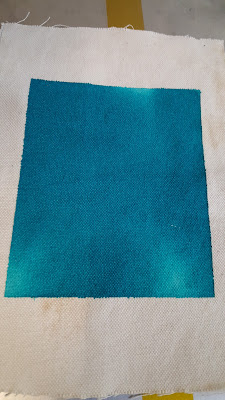
Sometimes I needed to check how heat was distributed on a surface. A cool but expensive way is to use a thermographic camera. I do not have one at hand. But an ongoing project uses thermochromic ink. That is an ink that becomes transparent once a temperature threshold is reached. It goes from a certain color to no color at all. So if you paint a piece of cloth and place it on a given surface you can do the measurement of temperature at each point. The following pictures show the heating process of a certain aluminium heated bed. My sample cloth was not large enough to cover the whole bet but you get the idea.  Heat sources start to show as whiter areas.   Now heat spreads a bit more.  Reaching the temperature threshold at many points For best results a glass on top would make sure the cloth is making contact with the whole surface evenly (top left corner was not having a good contact which explains the apparent colder temperature).

Dropcutter oddities

A while ago I decided to implement the drop-cutter algorithm as part of an ongoing software project. I found very interesting Anders Wallin website and his Opencamlib software. But the project I was working on was java-based. Once I had a working implementation I realized that while most of the output made sense, there were a few odds points that were clearly wrong. In a nutshell, the idea of drop-cutter algorithm is that it works by simulating a tool is being dropped till it touches the 3D model whose tool-path we are trying to obtain.  Using such a tool-path on a CNC machine equipped with the same tool, will render a geometrically accurate copy of the model. The algorithm checks, for each XY tool location, which is the highest Z-axis value that causes a contact point between the tool tip and the object's 3D model. We use a triangular mesh for our models (STL files).  Three types of checks are performed: Whether the tool tip touches a triangle's vertex. Whether the ...

Hephestos 2 heated bed

Image
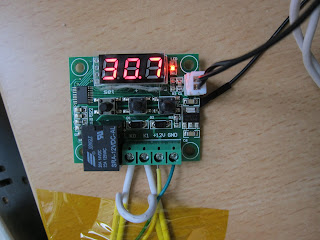
Since I got a beta version of Hephestos 2 from BQ before its launch, I have been using that printer more and more. After the initial annoyance about doing things on a certain way (like heating the extruder before performing a home move on an axis) I have got used to these details and I do not care anymore. And with a few exceptions were a part bottom failed to stick to the bed (nothing that a bit of hairspray could not fix) the printer has been delivering consistently quality prints. Z-axis became a bit noisy on long moves but I have no other complaints. However,  all the time I have been using PLA or Filaflex on a cold bed. There is no provision for a heated bed add-on so I had a look around for a stand-alone temperature controller.  I have found a simple pcb unit with display that controls a relay for a heating load up to 20A. Not sure how long that relay could last but for less than $5 I am going to give it a try. Next the bed, I do like aluminium beds with powe...